Open your Canvas export. Get Word, PDF and answer keys.
For teachers with a .imscc course file or a Canvas quiz .zip and no Canvas to open it in. Drop it below to read every page and quiz, then download Word files or printable tests. It all runs in your browser.
Drop your .imscc or QTI .zip here
Canvas course exports and Canvas quiz exports
Opens in your browser. Your file is never uploaded.
See it working
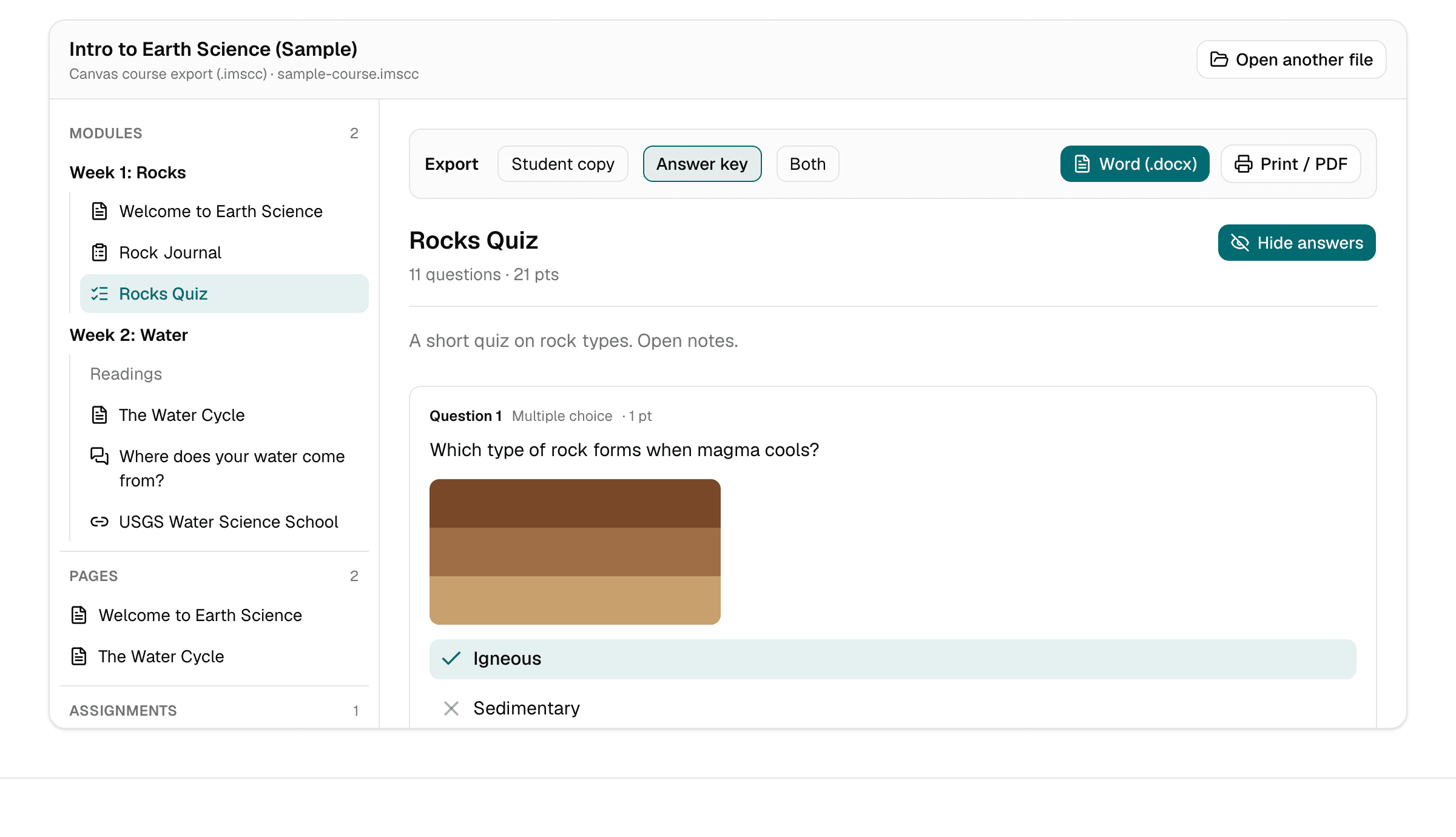
The sample course from this page, opened in OpenIMSCC: modules on the left, and a quiz with its answer key turned on, ready to export.
Why teachers use it
Private by design
No pasting course material into ChatGPT or Copilot. Your export is unzipped and read by your own browser, and nothing is uploaded, so student-facing content stays on your computer.
Images and formatting come along
Pages keep their headings, lists, tables and pictures. Word files have the images embedded, which AI copy-and-paste workarounds tend to lose.
Paper tests with an answer key
Turn a Canvas quiz into a student copy, an answer key, or both. Download it as Word or print it to PDF. It works on Mac, Windows and Chromebook, with nothing to install.
How it works
- 1
Find your export
A Canvas course export ends in .imscc. A classic quiz export (Settings › Export Course Content › Quiz) is a .zip. Both work.
- 2
Drop it on this page
Browse modules, pages with their images, assignments, discussions, files and every quiz question, with answers on or off.
- 3
Export what you need
Pick a page or quiz, choose student copy, answer key or both, then download Word (.docx) or print and save as PDF.
Free, with an optional Course pass
Free
$0
- Open .imscc course exports and Canvas QTI quiz .zip files
- Browse modules, pages, assignments, discussions, quizzes and files
- Export any page or quiz to Word or a printable PDF
- Student copy, answer key, or both
- One-line “Made with OpenIMSCC” footer on exports
Course pass
$12 once, per course
- Everything in Free, for one course
- Export whole course: every page, assignment and discussion as Word, every quiz as a student copy and an answer key, in one ZIP
- No footer on any export from that course
- No ads
- One-time payment, no subscription, no account. Refund on request within 14 days
The pass is tied to one course, so open its .imscc file first, then choose Get Course pass in the viewer.
Questions teachers ask
How do I open an .imscc file without Canvas?
Drop it on this page. An .imscc file is a ZIP of XML and HTML in the Common Cartridge format. OpenIMSCC reads the course structure and shows modules, pages, assignments, discussions, quizzes and files the way a teacher expects, instead of raw folders.
Is my course uploaded anywhere?
No. The file is read inside your browser tab and never sent to a server. We log anonymous usage events, such as “a file was opened” or “an export finished”, without file names or contents. The privacy policy has the details.
Can I get a Canvas quiz into Word with the answers?
Yes. Open the quiz, choose “Answer key” (or “Both” for a student copy followed by the key on a new page) and click Word (.docx). Correct choices are marked, and points, accepted answers and feedback are included.
Can I move my course into Google Classroom?
Google Classroom can’t import Canvas files directly. A practical route is to export each page or quiz to Word here, upload the files to Google Drive, and attach them to Classroom posts.
Does it work with New Quizzes?
Not yet. Classic quizzes (QTI 1.2, which Canvas uses for “Export quiz as QTI” and inside course exports) are supported. If your file won’t open, email us and we’ll look at adding it. You don’t need to send the file.
What does it cost?
Opening and browsing exports and exporting one page or quiz at a time is free. Free exports carry a one-line “Made with OpenIMSCC” footer. An optional Course pass ($12 once, per course, no subscription) removes the footer and exports the whole course as one ZIP.
Guides for specific exports
Your course is still in that file
Open it now and get the pages and quizzes you need as Word or PDF. Free, private, no sign-up.
Open your export